 Tiny Eden
Tiny Eden: how to remove plants
Plants reach a Wilting stage at the end of their cycle, and the official FAQ says wilting can signal replacement — or be kept deliberately, because wilting plants can be used to attract pollinators. To clear one, the developers' instruction is to use the trowel and aim at the plant or soil, not the planter; players add that the trowel has to be bought from the shop before it appears on your tool wheel.
Wilting is the decision point
The four growth stages are Sprout, Seedling, Mature and Wilting. Removal becomes relevant at the last one.
The FAQ frames wilting as a choice rather than a cleanup chore: it can signal replacement, or be used for specific purposes like attracting pollinators. Clearing every wilting plant on sight throws away that option.
Why you might keep a wilting plant
Some species carry a Requires pollination flag on their condition panel, visible in the publisher's Demo trailer. Those plants need pollinators present to produce.
Since the FAQ names attracting pollinators as a use for wilting plants, leaving one in place can be a support move for the plants around it. That is a deliberate trade of one planter for better output elsewhere.
What the footage shows about tools
The official Demo trailer shows the key prompts in the corner of the screen: Q for Tools, Tab for Tablet, I for Inventory, B for Craft, Alt for Details, X for Hints and F for Free hands.
It also shows a garden fork as a held item in the eight-slot hotbar, one of the prompts visible on the plant panel. That establishes hand tools exist; in the full release, the one that removes a plant is the trowel, covered next.
- Q — Tools
- Tab — Tablet
- I — Inventory
- B — Craft
- Alt — Details
- X — Hints
- F — Free hands
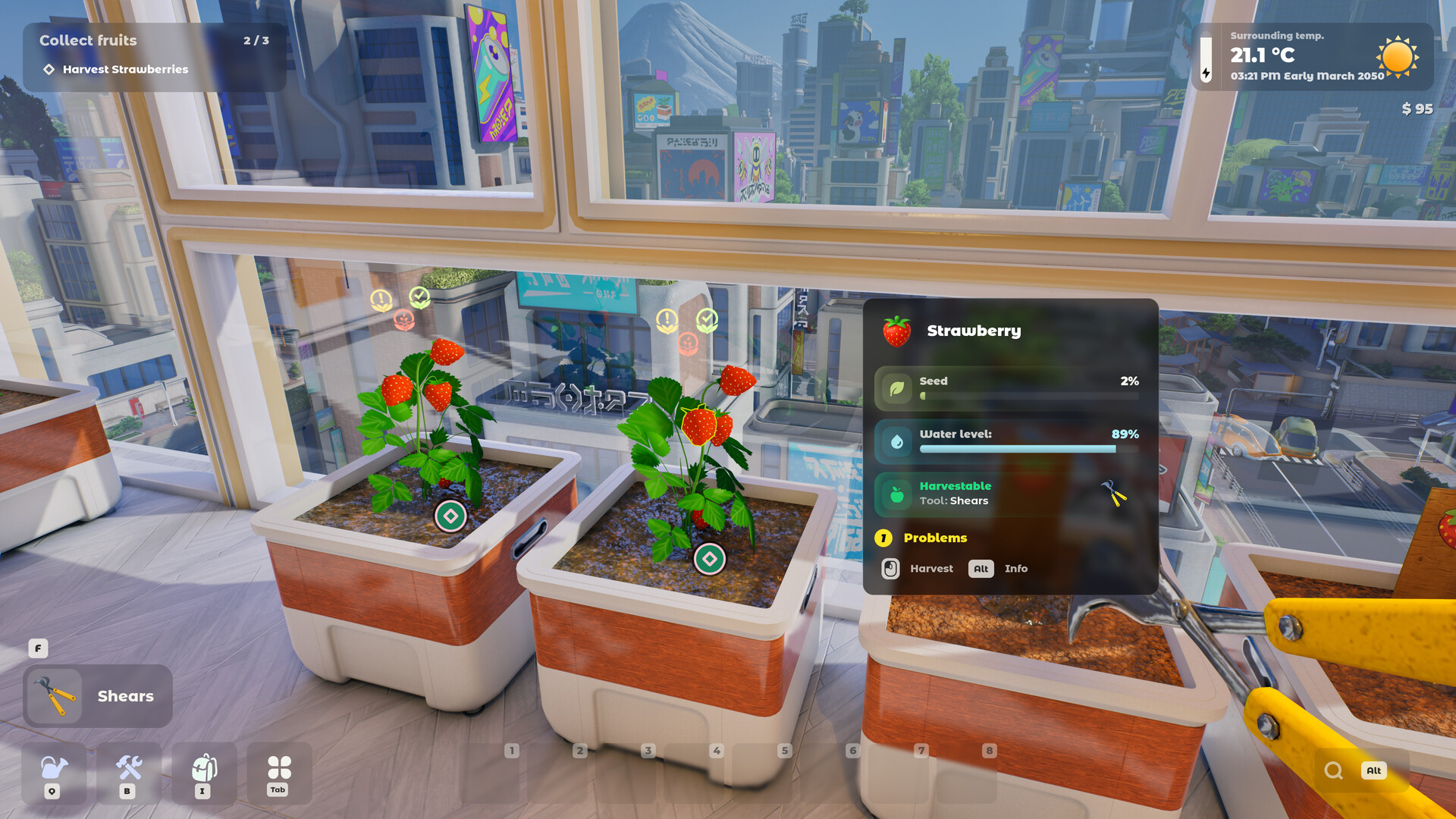
Use the trowel, and aim at the plant
The full game dropped the demo's removal option on the planter. Players who went looking for it found nothing, and the developers confirmed the replacement: the trowel, used on the plant itself, and used again on the soil if you want that out too. A second developer reply puts the key detail bluntly: the target must not be the planter.
The trowel is easy to think you already own, because one appears while you plant. Players report you have to buy it from the shop first, after which it shows up on your tool wheel; then hold the left mouse button with it aimed at the plant. Since Update #5, uprooting also earns Recycling experience. A removed plant turns into biomass, the raw material the composter needs for compost and, once upgraded, super compost.
Update #9 says drones no longer get stuck on tasks or pull out plants instead of working with them. Players had reported on 17 September that drones stopped clearing dead plants; that is covered on the drones page.
- "the demo had the "Remove plant/soil" option. they changed it to using a trowel that you can buy from the shop. it'll show up on your toolbelt once you buy it."
Space is the reason removal matters
The FAQ describes the scale as always relatively small, limited to balconies and a rooftop, with several hundred plants as the ceiling. Every planter you free is a planter you can reassign.
The economy adds pressure in the same direction: recipes require multiple ingredients, so you generally want a spread of crops rather than a large block of one.
Removing is not the same as reclaiming soil
Soil is mixed from seven components and degrades over time through nutrient consumption, organic degradation and soil-borne disease. Clearing the plant does not reset those values.
The trowel takes the soil out as well, used a second time. Whether soil can be refreshed in place rather than removed and replaced is not stated in any official source (unconfirmed).
Space is the real constraint
The apartment expands into new rooms and eventually the rooftop, with several hundred plants as the maximum. But two rooms never free up: the kitchen and the lab are fixed and cannot be converted.
Because recipes need multiple ingredients, the practical pressure is to keep a spread of species rather than a block of one. Clearing a planter is usually about rebalancing that spread.
There is no penalty for clearing wrong
The developers confirm there is no game over and no time pressure. Removing a plant you should have kept costs you that plant, not the run.
Time runs at 60:1, so replanting and seeing the result does not take long. That makes removal a low-risk decision compared with most simulation games.
Update #10 on 21 September fixed a related tool problem: the Knife, the Removal Tool, seeds and the Seeder now correctly target the object beneath the crosshair. If a tool acted on the wrong plant or planter before, that is the change to look for.
Not confirmed yet
- Whether soil can be refreshed in place rather than removed and replaced is not stated.
Frequently asked
- Should I remove wilting plants in Tiny Eden?
- Not automatically. The FAQ says wilting can signal replacement or be used to attract pollinators.
- What removes a plant in Tiny Eden?
- The trowel, aimed at the plant or soil rather than the planter, as the developers confirmed in the Steam discussions. Players add that it has to be bought from the shop and used by holding the mouse button.
- Does removing a plant restore the soil?
- Not stated in any official source (unconfirmed).
Sources
- Official Tiny Eden FAQ (Steam, 4 May 2026)
- Official Demo trailer (Digital Vortex Entertainment)
- Steam thread: “How do I remove withered plants now?”
- Steam thread: “How do you remove a dying plant?”
- Steam thread: “Can’t remove plant”
- Steam thread: “Dying Plants (demo-era thread)”
- Steam thread: “How to Level Recycling Skill?”
- Steam thread: “Supercompost?”
- Update #3 patch notes (Steam, 10 Sep 2026)
- Update #5 patch notes (Steam, 12 Sep 2026)
- Update #6 patch notes (Steam, 14 Sep 2026)
- Steam thread: “Since the update, drones aren't clearing dead plants anymore”
- Update #9 patch notes (Steam, 18 Sep 2026)
- Update #10 patch notes (Steam, 21 Sep 2026)
Every fact here is drawn from the official sources above. Points the developers have not confirmed are marked as not confirmed rather than guessed.