 Tiny Eden
Tiny Eden won't launch: what to check first
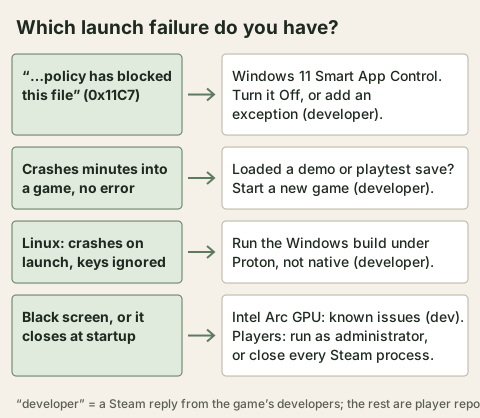
The launch failure with the clearest developer answer is error 0x11C7, a Windows 11 Smart App Control block: turning Smart App Control off, or setting Tiny Eden as an exception, got three players running again. The other causes the developers named are the Intel Arc graphics card, a save carried over from the demo or playtest, and the native Linux build, which they ask Linux players to replace with Proton.
- 0x11C7the Windows 11 Smart App Control error
- 3 playersback in the game after the Smart App Control change
- Protonwhat the developers ask Linux players to use
- Turing / RDNA2the GPU generations Steam's Linux notes name
Start with what the game does when you press Play
Launch problems on the Steam board fall into a few groups, and the fix depends on which one you have. The table lists what each group looks like, what the threads say caused it, and who said it, so a developer reply is not mixed up with a player's guess.
None of these is an official troubleshooting guide. The developers answer one thread at a time, and in several of them they ask for the same thing: your system details, and whether you are on Windows or Linux.
| What you see | Cause named in the threads | What was reported to work | Who said it |
|---|---|---|---|
| A Windows message that an application control policy blocked the file, error 0x11C7 | Windows 11 Smart App Control | Turn Smart App Control off, or add an exception for Tiny Eden | Developer |
| Crash a few minutes into a game, no error | Continuing a game started in the demo or the playtest | Start a new game instead of continuing | Developer |
| Game will not open, or opens and shuts | Known issues with Intel Arc graphics cards | No fix yet; the developers say it is proving hard | Developer |
| Native Linux build crashes at launch, or the movement keys do nothing | Bugs in the native Linux version | Run the Windows build under Proton instead | Developer |
| Black screen for a second, then back to the desktop | Not stated | Run TinyEden.exe as administrator | One player |
| Crash right after the splash screens, no message | Not stated | Close every Steam process in Task Manager, then start again | One player |
Error 0x11C7 and Smart App Control
In a thread opened on 9 September, a player on Windows 11 with Smart App Control enabled wrote that Windows blocked the game with an application control policy message and error code 0x11C7, even after verifying the game files. The developers' first reply was that it was new to them, and that a temporary fix was an exclusion for Tiny Eden in Windows Security, so Smart App Control would not have to be switched off.
A later developer answer explains the error and gives the simplest route. It affects Windows 11 only, they say, because Smart App Control does not exist in Windows 10, and it hits Steam games quite often with no pattern. Three players in two threads reported the game working again afterwards.
Step 1: Open Smart App Control
Press the Windows key, type Smart App Control and press Enter, the developers say.
Step 2: Switch it off
If it is set to Evaluation or On, change it to Off.
Step 3: Or set an exception
The developers say Tiny Eden can be set as an exception instead, but that other games with this error report turning it off as the easiest fix. One player, unsure of the exact path, named the Tiny Eden folder inside Steam's steamapps common folder.
Step 4: Start the game again
Players in both threads wrote that it launched after the change.
Continuing a demo or playtest save
A player whose game shut down two or three minutes in, every time, wrote that the demo had not done this. The developers asked whether they had started a new game or continued, and added a note shortly afterwards: a game carried over from the demo or the playtest will crash, or be hugely bugged.
That matches the save rules already on the site: saves from before version 0.10.0 are not supported, and demo saves do not work. The pages on saves that vanish and on the demo save rule cover the details.
Linux, Proton and the graphics card
On launch day a Linux player reported that the native build crashed at launch while the Windows build under Proton ran fine, and the developers replied that they would check it as soon as possible. Two weeks on, a player whose A, S and D keys did nothing was told to run the game under Proton instead, because a few bugs remain in the native version.
Which Proton to pick is a player question. One player fixed a crash by setting Proton Experimental in the game's properties. Another had Proton 9.0-4 crash within a second, and reported that Proton Hotfix worked.
Steam's Linux notes add a hardware line that the Windows listing does not have. They say the game does not start on GPUs or drivers without mesh shader support. The game's own saves also live in different folders on Linux, covered on the save file page.
| Steam store page | Windows | Linux |
|---|---|---|
| OS | Windows 10 64-bit minimum, Windows 10/11 recommended | SteamOS 3.x or Ubuntu 22.04 and newer |
| Graphics, minimum | GeForce GTX 1050 Ti 4 GB or Radeon RX 570 4 GB | 4 GB VRAM, Vulkan 1.3 with mesh shader support (AMD RDNA2 or newer, NVIDIA Turing or newer) |
| Graphics, recommended | GeForce RTX 2060 or Radeon RX 6600 | Radeon RX 6600 or GeForce RTX 2060 |
| Memory and storage | 16 GB RAM, 10 GB space, DirectX 12 | 16 GB RAM, 10 GB space, Vulkan 1.3 |
Intel Arc
The developers' reply to a player whose game started and then closed was a question: are you using an Intel Arc graphics card? On 21 September they asked a second player the same thing and called it known to have issues.
No fix or date has been published. If you are on Arc, the threads offer nothing beyond the developers' own admission, so report your setup rather than reinstalling.
What to send when you report it
In the game, press Esc and choose Report a bug. Since Update #8 a report includes a snapshot of your save from the moment the problem happened, which matters for crashes that only happen in one save. See the patch notes page for what else changed, and the older demo crash page for the reports from before launch.
In several Steam threads the developers ask for the same details, so put them in your first post.
- Processor, graphics card and RAM
- Windows or Linux, and if Linux, whether native or Proton
- Whether the save is a new game or carried over from the demo or playtest
- Whether Smart App Control is on, if Windows shows an application control message
Not confirmed yet
- Whether the Windows version needs mesh shader support is not stated on the store page.
- The developers have not published a fix for Intel Arc or a date for one.
- Why running as administrator helped one player is not explained.
Frequently asked
- What is error 0x11C7 in Tiny Eden?
- The developers say it is Windows Security or Smart App Control blocking the game, and that it affects Windows 11 only. Turning Smart App Control off, or setting an exception for Tiny Eden, got three players running again.
- Does Tiny Eden run natively on Linux?
- A native build exists, but the developers ask Linux players to run the Windows build under Proton because of bugs in the native version.
- Why does the game crash a few minutes in?
- One cause the developers named is continuing a game from the demo or the playtest. They say to start a new game.
- Does Tiny Eden work on Intel Arc?
- The developers say it has known issues on Intel Arc and that a fix is proving hard. No date has been given.
Sources
- Steam thread: “Game won't launch – Windows blocks Tiny Eden with error 0x11C7”
- Steam thread: “Just downloaded update from today and now game will not load up. Failed to start process??”
- Steam thread: “Game Doesn't launch on Windows after new update.”
- Steam thread: “[Bug] Game Crashes on Startup”
- Steam thread: “Linux support only works under proton”
- Steam thread: “crashing”
- Steam thread: “2-3 minutes into gameplay and it crashes, shutting down the game - UNPLAYABLE”
- Steam thread: “Game crashes on startup (black screen) unless runas Adminstrator”
- Steam thread: “Game won't launch at all.”
- Steam thread: “Cant Play”
- Steam thread: “A S D controls are not working”
- Tiny Eden Steam store page
- Update #8 patch notes (Steam, 17 Sep 2026)
Every fact here is drawn from the official sources above. Points the developers have not confirmed are marked as not confirmed rather than guessed.